
I wanted my Actor to sell scraped data to agents I don't own, without making them sign up for anything. That turned into a week of reading docs and failed test transactions. Here's what came out of it.
Every x402 tutorial covers the buyer side. The agent pays, gets data, done. Nobody shows how to build the thing on the other end, the part that receives the payment, checks it's real, and decides whether to hand over the data. That's the half this covers.
You'll end up with a Crawlee Actor on Apify that takes x402 receipts over USDC on Base, checks them against the blockchain with Viem, blocks reused receipts with Apify Key-Value Store, and saves every paid call to Apify Dataset. I'll also show the LangGraph node on the buying side so you can see the whole thing run.
Why x402 and not API keys
Think about what it takes to let an agent pay for something today. It doesn't have a credit card. It can't click through a signup form. Pre-funded API keys work, but a human has to create them, store them, and wire them in first. The moment you need a human in that loop, the agent isn't really autonomous anymore.
x402 puts the payment inside the HTTP request itself. The agent holds a USDC wallet on Base, signs an authorization for a specific amount to a specific recipient, attaches it to the request, and sends it. My Actor confirms the payment happened on the blockchain, then returns the data. No accounts, no billing page, nothing to set up in advance.
How it works
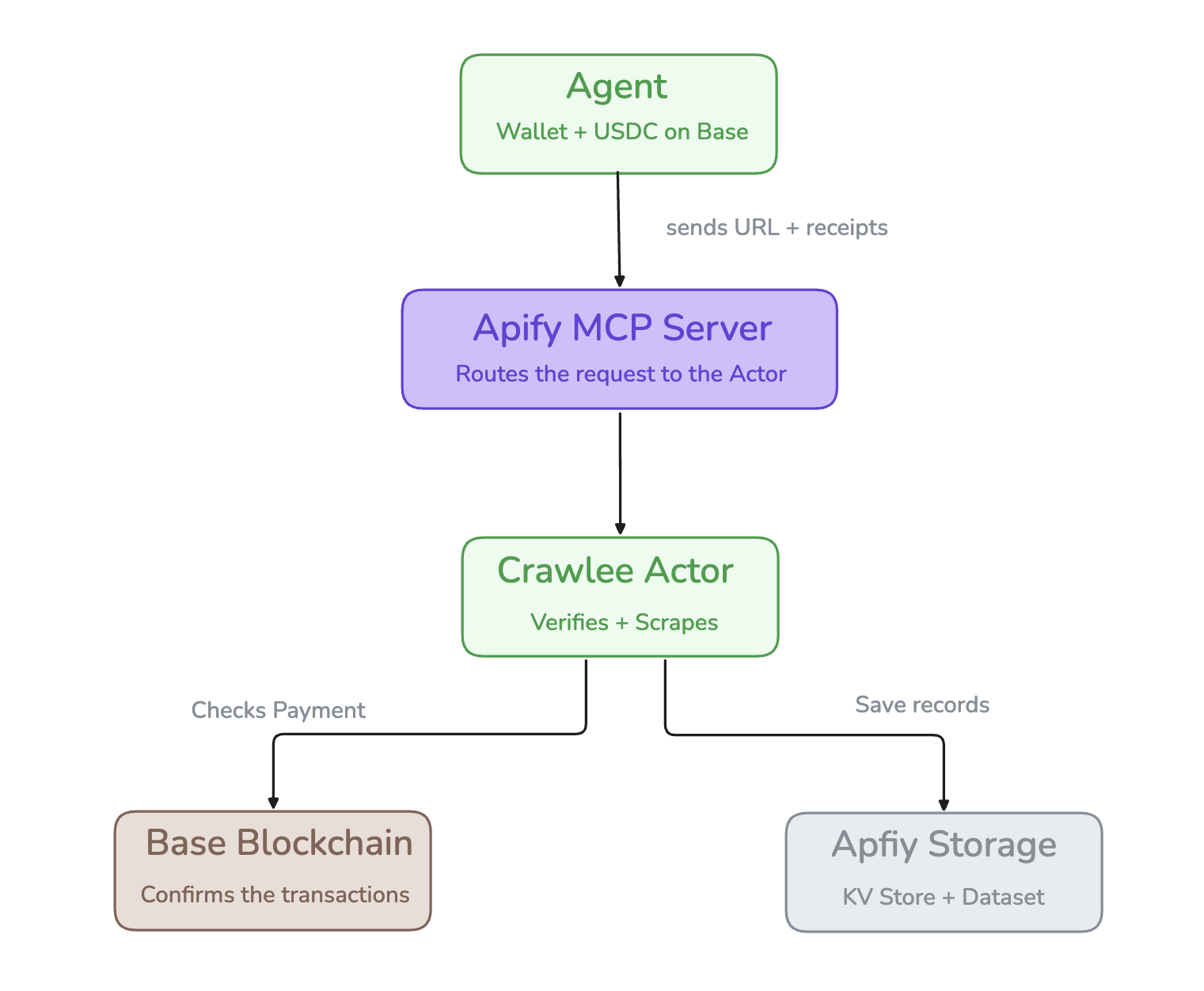
Figure 1. Request path from agent to Actor to blockchain and back.
There are four parts, so let's follow one request through all of them.
It starts with the agent. It has a wallet on Base with some USDC in it. When it wants data, it writes an x402 receipt, which is really just a signed note saying "I'm sending this much to this wallet," and sends it along with the URL it wants scraped.
That request hits the Apify MCP server. This is what makes my Actor show up as a tool the agent can call. It uses Streamable HTTP, which is the transport the April 2026 MCP spec moved to after dropping the older SSE approach.
Then the Crawlee Actor takes over. It runs the payment through four checks and won't scrape anything until all four pass. Once they do, the results go into Apify Dataset and the used receipt gets stored in Apify Key-Value Store so it can't be spent twice.
Under all of it is the Base blockchain, and that's the part I actually trust. I never take the agent's word that it paid. I call getTransactionReceipt through viem and check the chain myself.
The receipt shape:
interface X402Receipt {
  txHash: `0x${string}`;
  payer: string;      // informational only, the real payer is read on-chain
  amount: bigint;     // informational only, the real amount is read on-chain
  recipient: string;  // informational only, the real recipient is read on-chain
  nonce: string;
  timestamp: number;  // unix seconds
}
The payer, amount, and recipient fields are what the agent claims. The Actor does not trust them. It reads the real values from the blockchain in check 4 and logs those instead. The fields the Actor actually acts on are txHash, nonce, and timestamp.
Setup
Before any code, a short setup list. You need an Apify account. The free plan is enough to build, deploy, and test everything here, though to actually monetize the Actor later you'll want Pay Per Event (PPE) pricing, which is the only model x402 supports.
You also need a wallet address on Base to check payments against. That's it for the wallet side. The Actor only ever reads your wallet address to confirm a payment landed there. It never needs your private key, and every Viem call it makes is read-only, so there's nothing to sign and nothing to leak.
npm install -g apify-cli
apify login
apify create pay-per-scrape --template ts_empty
cd pay-per-scrape
npm install crawlee viem
Add these as environment variables in Apify Console under Actor Settings:
WALLET_ADDRESS=0xYourWalletAddress
MIN_PAYMENT_USDC=1000000
MAX_RECEIPT_AGE_SECONDS=300
Mark WALLET_ADDRESS as secret. The other two are safe to leave visible.
The payment check

Figure 2. The four checks, run cheapest first. Any failure rejects the request.
Get this wrong and you either give data away for free or turn away paying customers. Four checks run in order, cheapest first:
Check 1 (nonce): Has this receipt been used before? Looks it up in Apify Key-Value Store. If it's there, someone is replaying a payment. Reject.
Check 2 (age): Is the receipt older than 5 minutes? A stolen receipt is only useful within that window. Reject anything older.
Check 3 (transaction): Did this transaction actually happen on Base and succeed? Calls Viem's getTransactionReceipt with three retries to handle the gap between submission and confirmation.
Check 4 (USDC transfer): Did the right amount of USDC actually go to your wallet? Instead of trusting what the agent claims in the receipt, the code reads the actual Transfer event from the USDC contract logs on-chain. The agent cannot lie about this. The full code is in the next section.
The Actor handler
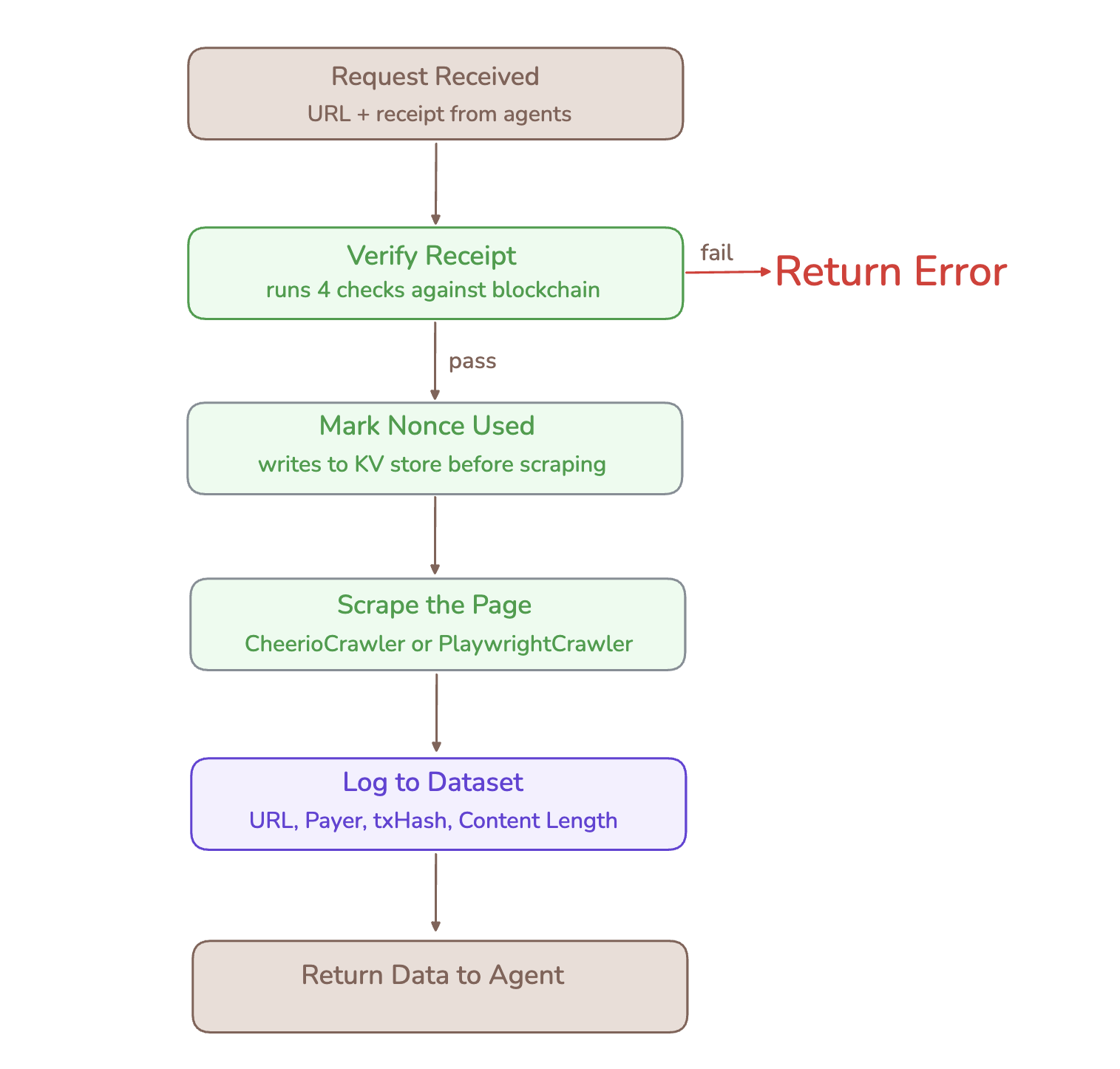
Figure 3. The handler flow. The nonce is burned before scraping, not after.
With verifyReceipt done, the rest is short. Here is the complete src/main.ts, everything in one file:
import { Actor, log } from 'apify';
import { CheerioCrawler } from 'crawlee';
import { createPublicClient, http, parseAbiItem, decodeEventLog } from 'viem';
import { base } from 'viem/chains';

interface X402Receipt {
  txHash: `0x${string}`;
  payer: string;      // informational only, the real payer is read on-chain
  amount: bigint;     // informational only, the real amount is read on-chain
  recipient: string;  // informational only, the real recipient is read on-chain
  nonce: string;
  timestamp: number;  // unix seconds
}

const client = createPublicClient({
  chain: base,
  transport: http(),
});

const USDC_ADDRESS = '0x833589fCD6eDb6E08f4c7C32D4f71b54bdA02913';

const TRANSFER_ABI = parseAbiItem(
  'event Transfer(address indexed from, address indexed to, uint256 value)'
);

interface VerifiedPayment {
  ok: boolean;
  onChainPayer?: string;
  onChainAmount?: bigint;
}

async function verifyReceipt(receipt: X402Receipt): Promise<VerifiedPayment> {
  const { txHash, nonce, timestamp } = receipt;

  const alreadyUsed = await Actor.getValue(nonce);
  if (alreadyUsed) {
    log.info(`Rejected: receipt already used - ${nonce}`);
    return { ok: false };
  }

  const age = Math.floor(Date.now() / 1000) - timestamp;
  const maxAge = Number(process.env.MAX_RECEIPT_AGE_SECONDS ?? 300);
  if (age > maxAge) {
    log.info(`Rejected: receipt is ${age}s old`);
    return { ok: false };
  }

  let tx = null;
  for (let attempt = 0; attempt < 3; attempt++) {
    try {
      tx = await client.getTransactionReceipt({ hash: txHash });
      if (tx) break;
    } catch {
      await new Promise(r => setTimeout(r, 2000));
    }
  }

  if (!tx || tx.status !== 'success') {
    log.info(`Rejected: transaction not found - ${txHash}`);
    return { ok: false };
  }

  const transferLog = tx.logs.find(
    l => l.address.toLowerCase() === USDC_ADDRESS.toLowerCase()
  );

  if (!transferLog) {
    log.info('Rejected: no USDC transfer found in transaction logs');
    return { ok: false };
  }

  let actualFrom: string;
  let actualTo: string;
  let actualValue: bigint;

  try {
    const decoded = decodeEventLog({
      abi: [TRANSFER_ABI],
      data: transferLog.data,
      topics: transferLog.topics,
    });
    actualFrom = (decoded.args as any).from as string;
    actualTo = (decoded.args as any).to as string;
    actualValue = (decoded.args as any).value as bigint;
  } catch {
    log.info('Rejected: could not decode USDC transfer log');
    return { ok: false };
  }

  const minPayment = BigInt(process.env.MIN_PAYMENT_USDC ?? '1000000');
  const correctRecipient = actualTo.toLowerCase() === process.env.WALLET_ADDRESS?.toLowerCase();
  const enoughPaid = actualValue >= minPayment;

  if (!correctRecipient || !enoughPaid) {
    log.info(`Rejected: on-chain recipient ok=${correctRecipient}, amount ok=${enoughPaid}`);
    return { ok: false };
  }

  // Return the values read from the blockchain, not the agent's claims,
  // so the handler logs what actually happened on-chain.
  return { ok: true, onChainPayer: actualFrom, onChainAmount: actualValue };
}

Actor.main(async () => {
  const input = await Actor.getInput<{
    url: string;
    receipt: X402Receipt;
  }>();

  if (!input?.url || !input?.receipt) {
    throw new Error('Missing url or receipt in input');
  }

  const { url, receipt } = input;

  const payment = await verifyReceipt(receipt);
  if (!payment.ok) {
    await Actor.setValue('result', { error: 'Payment check failed' });
    return;
  }

  // Mark the nonce as used before scraping, not after.
  // If the scrape crashes, the receipt is already burned.
  // The agent resubmits with a new payment. Marking it after
  // would let a crash turn into a free retry.
  await Actor.setValue(receipt.nonce, true);

  const pageText: string[] = [];

  const crawler = new CheerioCrawler({
    async requestHandler({ $ }) {
      $('script, style, nav, footer, header').remove();
      pageText.push(
        $('body').text().replace(/\s+/g, ' ').trim().slice(0, 8000)
      );
    },
  });

  await crawler.run([url]);

  await Actor.pushData({
    url,
    payer: payment.onChainPayer,
    amountUsdc: (Number(payment.onChainAmount) / 1_000_000).toFixed(6),
    txHash: receipt.txHash,
    nonce: receipt.nonce,
    scrapedAt: new Date().toISOString(),
    contentLength: pageText[0]?.length ?? 0,
  });

  await Actor.setValue('result', {
    data: pageText[0] ?? '',
    url,
    txHash: receipt.txHash,
  });
});
For JavaScript-heavy pages, swap CheerioCrawler for PlaywrightCrawler. Everything else stays the same.
Here's the LangGraph node on the buying side:
import os
from apify_client import ApifyClient

def paid_data_node(state: dict) -> dict:
    client = ApifyClient(token=os.environ["APIFY_TOKEN"])

    run = client.actor("mostafaosama/pay-per-scrape").call(
        run_input={
            "url": state["target_url"],
            "receipt": state["payment_receipt"],
        }
    )

    if run["status"] != "SUCCEEDED":
        return {**state, "error": "Actor run failed", "should_replan": True}

    result = client.key_value_store(
        run["defaultKeyValueStoreId"]
    ).get_record("result")["value"]

    if "error" in result:
        return {**state, "error": result["error"], "should_replan": True}

    return {**state, "scraped_data": result["data"]}
should_replan tells the graph the payment was rejected and to try a different path. The same idea works in the OpenAI Agents SDK. The Actor shows up as a callable tool and you handle rejection in the response.
The example above calls the Actor directly through the Apify client, which is the simplest way to test the full loop. In production you would expose the same Actor through the Apify MCP server so the agent discovers and calls it as an MCP tool. The Actor code does not change. Only the transport in front of it does.
Every paid call also leaves a record: one row in Apify Dataset with the transaction hash saved on it. So even months later, you can take any txHash, look it up on the Base block explorer, and see exactly what happened.
Here is a run completing on Apify's servers after a verified payment:

A verified run completing in Apify Console.
The scraped content comes back in the result, in this case the live Hacker News front page:

Scraped Hacker News content returned after payment passed.
And every paid call lands as one row in Dataset, with the receipt embedded so you can cross-check it against the blockchain later:
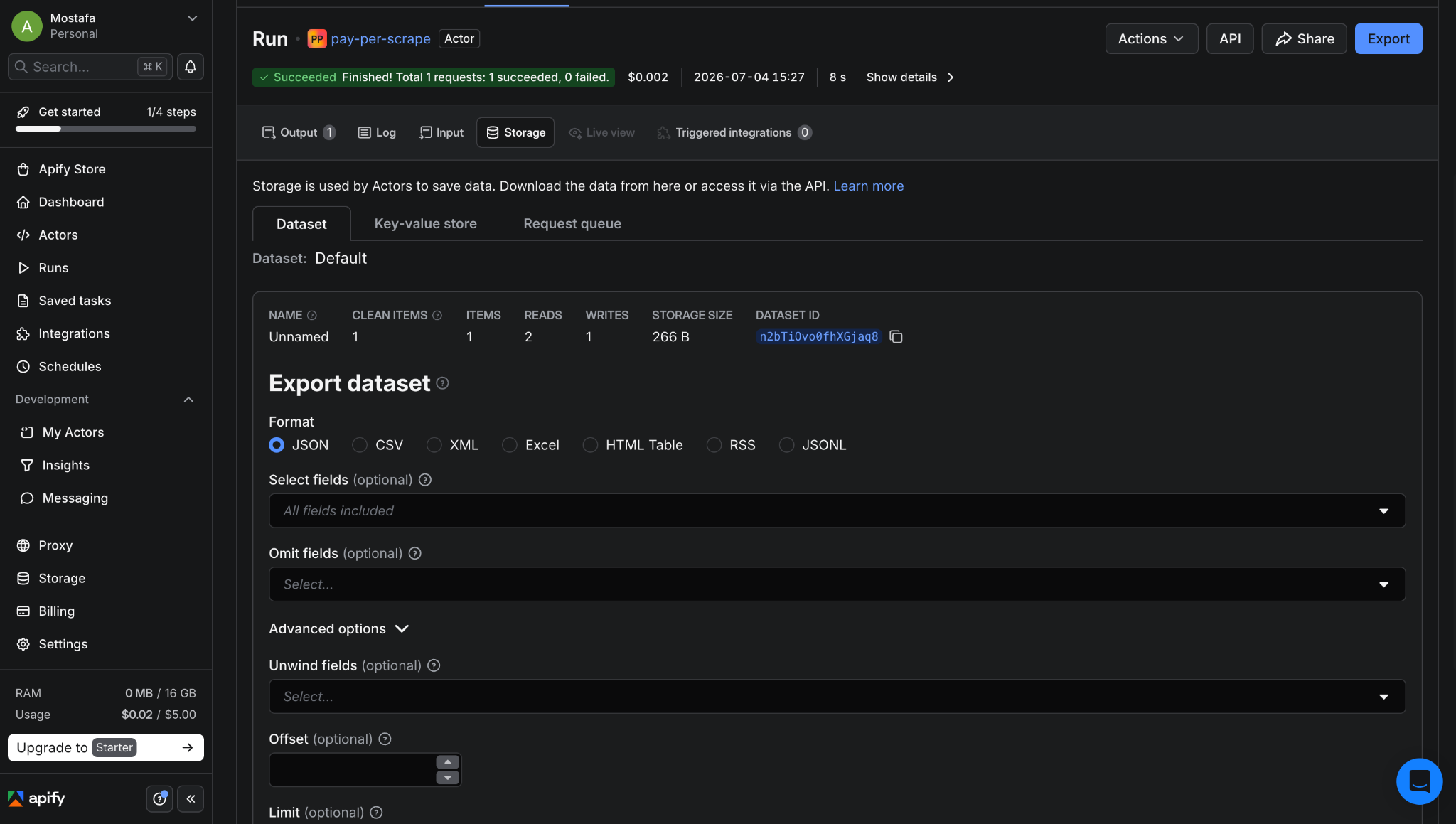
Each paid call logged to Dataset with the receipt.
Costs and next steps
Here are the real numbers from a run against the Hacker News front page, which returned 3,858 characters of structured content:
| Item | Cost per call |
|---|---|
| Base gas | $0.006 |
| USDC paid to Actor | $1.00 |
| Apify compute | $0.001 |
| Total operating cost | ~$0.007 |
Gas on Base moves with network conditions, so it's worth checking basescan.org for the current rate. Apify compute for a single CheerioCrawler run stays well under a cent. The USDC is income, not a cost.
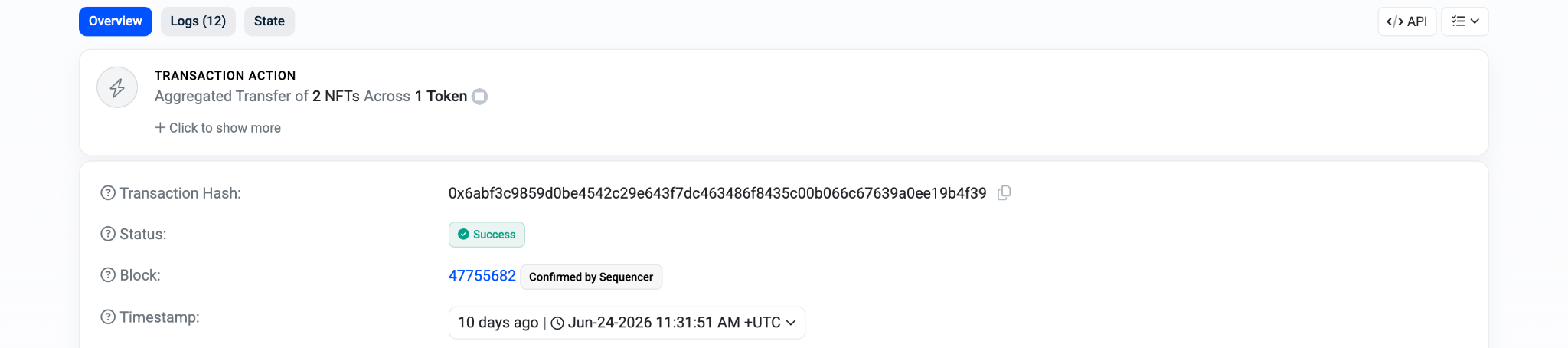

The USDC transfer confirmed on basescan.org.
Three things worth adding if you take this to production:
Cache results by receipt ID. Same URL twice in a short window returns from cache instead of scraping again. Same price for the buyer, less work for you.
Send a signal back when the scrape fails after payment passes. The agent paid and got nothing. It needs to know so it can do something about it.
Move the payment check into a shared Actor. If you build more paid Actors, you don't want separate copies of this logic drifting apart.
The full source is on GitHub here. Run Apify push, set PPE pricing in Apify Console, and it's live.
Further reading: