
Build your first AI Agent using Firecrawl and OpenAI GPT. For just $0.042, you'll process hundreds of Hacker News comments and extract the best advice from them automatically.
Introduction
You're confused about your career and want some advice, so you open Hacker News and search for "career advice for developers." You find a thread with 619 comments. Perfect!
Three hours later, you've read 47 arguments about whether recruiters are evil, 12 tangents about Rust, and you still don't know if you should negotiate salary before or after the offer.
Sounds familiar? Well, there's a better approach.
I built a tool that scrapes top HackerRank discussions on any topic, extracts the
highest-quality comments, and uses an LLM to create a "Top 10 Tips" summary.
No more manual scrolling through hundreds of comments.
Here's what you'll build:
- A Firecrawl AI-powered web scraping tool that navigates HN discussions automatically
- Structured data extraction that captures the best comments
- An LLM analysis system that synthesizes everything into actionable advice
The tool runs in about 90 seconds, costs roughly $0.042 per topic, and works
on anything, career advice, salary negotiation, technical interviews, startup
mistakes, you name it.
By the end of this tutorial, you'll have your own advice extraction system.
TL;DR
- What you're building - A tool that automatically scrapes Hacker News discussions, extracts high-quality comments, and uses an LLM to create a "Top 10 Tips" summary on any topic.
- How it works - Firecrawl Agent scrapes 5 discussions (25 comments) in plain English. No CSS selectors. No Selenium. LLM synthesizes raw comments into actionable advice.
- Cost and speed - ~$0.042 per run, 90 seconds total. Free tiers available for both Firecrawl and W&B Inference.
- Key advantage - One Firecrawl prompt replaces 50-100 lines of Selenium code. No maintenance when sites update their HTML structure.
- Real results - Extracted career advice from 619-comment HN threads. Got 10 actionable tips without reading a single tangent about Rust.
Why FireCrawl’s Agent?
If you have written Selenium scrapers before. You know the drill:
- 47 lines just to handle the cookie banner
- time.sleep(3) everywhere because nothing loads when you expect it
- Your script breaks every time the site changes a CSS class from .comment-text to .comment-body
On the other hand, Firecrawl makes our life much easier. Here's what the same task looks like with two different approaches:
Traditional Scraping (Selenium/BeautifulSoup):
├── Navigate to search URL
├── Wait for JavaScript to load
├── Parse search results HTML
├── Loop through results
├── Click into each post
├── Wait for comments to load
├── Handle "load more" buttons
├── Parse nested comment structure
├── Handle pagination
└── 150-200 lines of fragile codeFirecrawl /agent:
├── "Go to HN, search for X, click into posts, extract top comments"
└── Done. Structured JSON returned.
Traditional web scraping is a nightmare. You're not just writing CSS selectors, you're
managing headless browsers, handling JavaScript rendering, building retry logic for rate limits, debugging timing issues when elements don't load, maintaining code every time a site updates its HTML structure, and somehow making it all work across different websites with completely different architectures.
A "simple" scraper becomes 200+ lines of fragile code that breaks the moment a site
changes a single class name.
Firecrawl's Agent eliminates all of this. You describe what you want in plain English,
and it handles the clicking, scrolling, waiting, JavaScript rendering, and navigation
automatically. No CSS selectors. No browser automation. No maintenance headaches. It's
like having an experienced engineer who actually reads your instructions and figures out
the messy details.
Prerequisites
So what exactly would you need in order to build your own AI Agent that utilizes up-to-date data? Here is the list, it's quite simple:
✅ Python 3.8+
✅ 5 minutes
✅ Two API keys (both have free tiers)
✅ Interest in automating repetitive research
The Architecture
Finally, the tutorial part! Starting with our architecture. We will divide our code into two main steps.
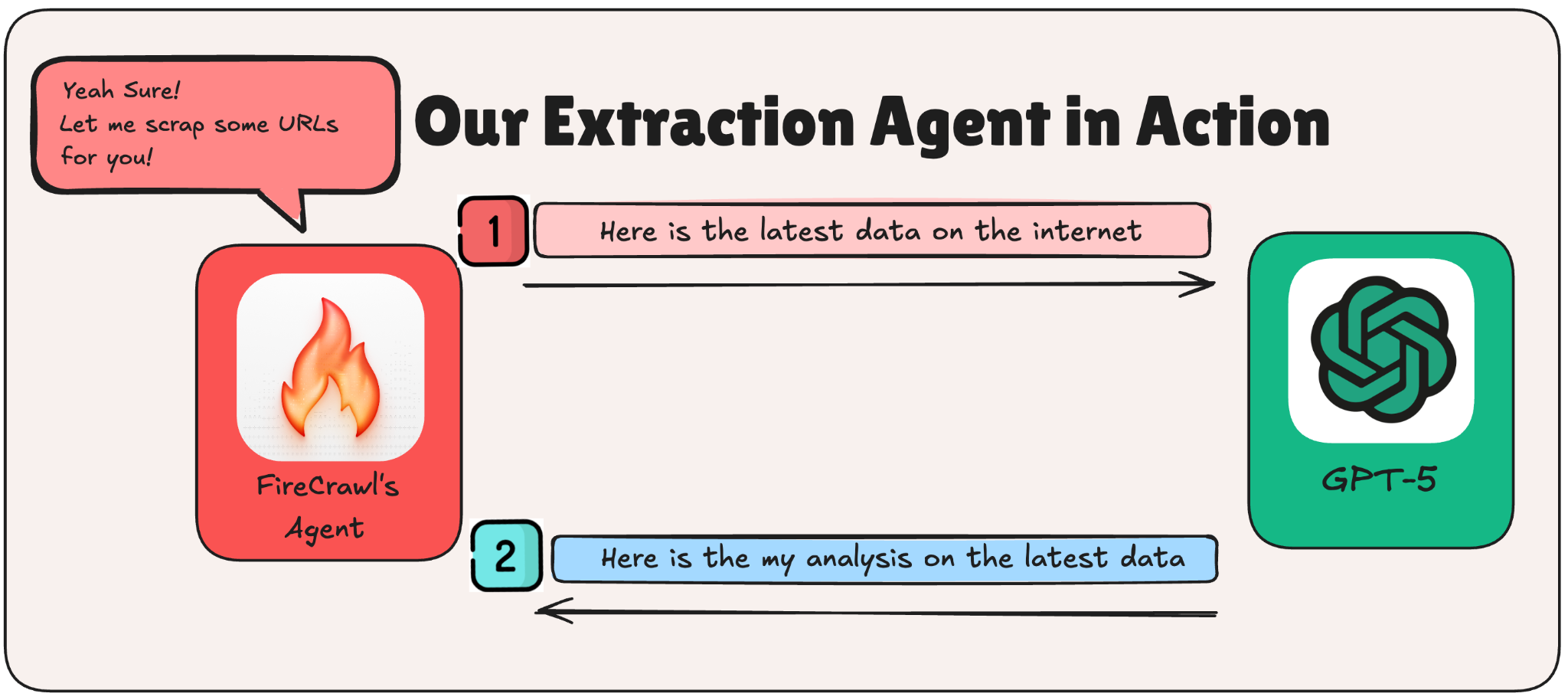
Why two steps? Separation of concerns. If Step 1 breaks, you know it's a scraping issue. If Step 2 gives you garbage, it's a prompt issue. You can also swap LLMs without touching the scraper, which is handy when you want to experiment. Having said that, the LLM used is no longer an issue, you can go ahead and swap it with your LLM of choice.
Step 1: Scraping Hacker Rank Using Firecrawl’s Agent
To start our process, first we need to install and import our needed dependencies. For this Firecrawl tutorial, we will be relying on the following.
!pip install firecrawl-py openai pydanticNow let's set up the imports and configuration.
What each import does:
- json: For pretty-printing the data we get back
- datetime: To timestamp our reports
- Pydantic: To define the structure of data we want from Firecrawl
- FirecrawlApp: The Firecrawl Python SDK
- OpenAI: Works with any compatible OpenAI API (including W&B Inference)
from datetime import datetime
from typing import List, Optional
from pydantic import BaseModel, Field
from firecrawl import FirecrawlApp
from openai import OpenAI
Next, configure your API keys and settings. You can get your own Firecrawl API key from https://firecrawl.dev/app/api-keys (free tier available, no credit card required).
FIRECRAWL_API_KEY = "Insert-Your-Firecrawl-API-Key"For simplification purposes, we will be using an easy to use LLM through an API interface. You can utilize whatever LLM you find easiest for you.
WANDB_API_KEY = "Insert-Your-WANDB-API-Key"
LLM_MODEL = "openai/gpt-oss-120b"
For our run, we will be going with career advice as our topic of choice. You can play with this topic as you want.
TOPIC = "career advice"Define the Data Schema
Firecrawl can return structured JSON if you tell it what shape to expect. We use Pydantic models as a contract: "Hey Firecrawl, give me data that looks like this."
What each schema represents:
- HNComment: A single comment with its text, author, and upvotes
- HNPost: A discussion post with its metadata and list of top comments
- HNAdvice: The full response: topic + list of posts
class HNComment(BaseModel):
    content: str = Field(description="Comment text")
    author: Optional[str] = None
    points: Optional[int] = None

class HNPost(BaseModel):
    title: str
    hn_url: Optional[str] = None
    points: Optional[int] = None
    num_comments: Optional[int] = None
    top_comments: List[HNComment]

class HNAdvice(BaseModel):
    topic: str
    posts: List[HNPost]
Now for the prompt. This is where the magic happens. The prompt is your instruction manual for the agent. Be specific. Number your steps. Tell it what to skip.
Step 1: Scrape Hacker News with Firecrawl /agent
This is where the magic happens. We write a plain English prompt telling the Firecrawl agent what to do, and it handles all the clicking, waiting, and extracting.
def scrape_hn(topic: str) -> dict:
    app = FirecrawlApp(api_key=FIRECRAWL_API_KEY)

    prompt = f"""
    Find the best advice about "{topic}" from Hacker News.

    1. Go to: https://hn.algolia.com/?q={topic.replace(' ', '+')}&type=story&sort=byPopularity
    2. Find the top 5 most popular discussions
    3. Click into each discussion
    4. Extract: Title, Points, Number of comments, URL
    5. From each, extract top 5 insightful comments (skip jokes)
    """

    result = app.agent(prompt=prompt, schema=HNAdvice.model_json_schema())
    return result.data if hasattr(result, 'data') else result
Let's break down what's happening here:
- Initialize Firecrawl: Create the app with your API key
- Build the prompt: This is your instruction manual for the agent:
- Start at the HN Algolia search page
- Find top 5 discussions
- Click into each one
- Extract post metadata + top 5 comments
- Skip jokes, focus on real advice
- Call the agent: Pass the prompt and schema to app.agent()
- Handle the response: Check for errors, extract the data
- Print results: Show the raw JSON so you can see exactly what came back
What Did We Actually Get?
Here are the numbers from our run:
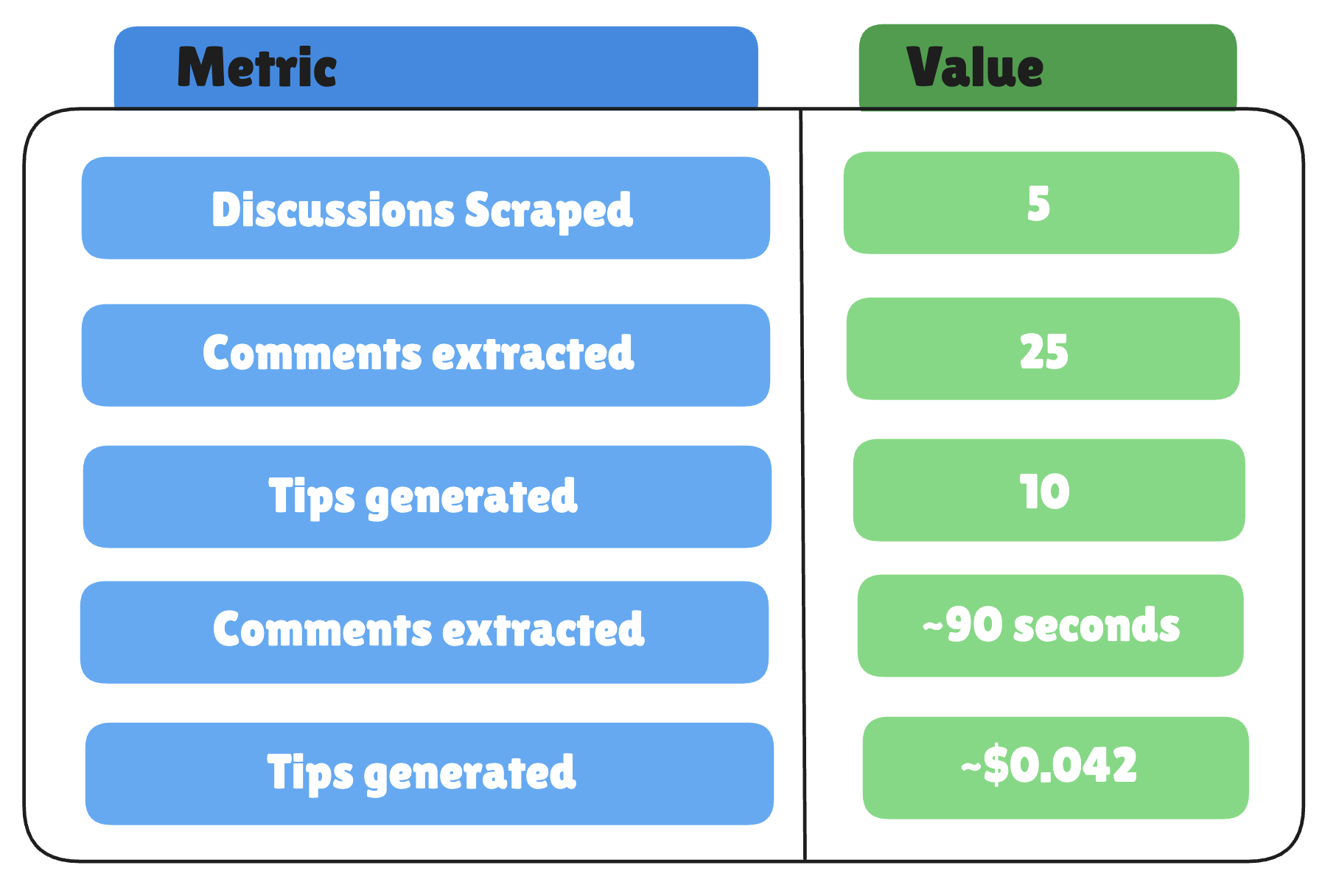
With the following being a small sample of what the agent returned:
------------------------------------------------------------
   RAW DATA FROM FIRECRAWL:
------------------------------------------------------------
{
  "topic": "career advice",
  "posts": [
    {
      "title": "Career advice nobody gave me: Never ignore a recruiter",
      "hn_url": "https://news.ycombinator.com/item?id=30163676",
      "points": 790,
      "num_comments": 619,
      "top_comments": [
        {
          "content": "I also recommend a response to every recruiter, but you don't need to explain your privilege, you don't need to suck up to them, and you don't need to justify your actions. \"Hey ____. Before we move forward, can you provide me with the company name, a job description, and the expected compensation. Regards\"",
          "author": "Spinnaker_",
          "points": null
        },
        {
          "content": "Bad career advice I received early in my career: Don't talk compensation until late in the interviewing process after you've already convinced them to hire you. Compensation is the first thing I bring up now. \"I currently make X salary, Y annual bonus, and Z equity. This position will need to exceed all 3 by at least 20% before I even consider it. Does that sound doable? If not, let's not waste any more of each other's time.\" Way too many lowballers out there.",
          "author": "DebtDeflation",
          "points": null
        },
        {
          "content": "Ignore recruiter if they: * are a part of a large firm * use multiple fonts, sizes, or any color in their emails * send an email _and_ an InMail * text or call you * jokingly or seriously refer to themselves as a stalker * automatically substitute in your skills or past company name * ask for your resume when they can obviously download the LinkedIn pdf * don't disclose comp * don't disclose the company name * use tracking pixels or redirect links * send an automated sequence of follow-up emails (4 follow-ups = bot) Write them back if they seem like a human! \"Not interested at this time, but let's keep in touch. Thanks for your time\" should do.",
          "author": "beeskneecaps",
          "points": null
        },
        {
          "content": "The first thing many recruiters will want to do is \"hop on a call\". Resist this urge. In fact, don't even give them your phone number. Force them to use email to contact you. A phone call is a good way of wasting your time. If you actually need to call them on the phone, call them. There are lots of techniques recruiters will use to waste your time. One common one is if pressed on compensation range you'll get the answer that it's \"competitive\". Use a template like this to simply filter out time-wasters. If they want to get on a call, resist giving concrete details or otherwise just give you bad vibes, just stop responding. They can't call you. They don't have your number. Move on.",
          "author": "cletus",
          "points": null
        },
Step 2: LLM Analysis
25 comments is great, but it's still a wall of text. Some advice overlaps. Some contradicts. You need a smart friend to read it all and say: "Here's what actually matters." Here is where a smart Large Language Model comes in handy.
def analyze(data: dict) -> str:
    advice_text = ""
    for i, post in enumerate(data.get('posts', []), 1):
        advice_text += f"\n### {post.get('title', '')}\n"
        for comment in post.get('top_comments', []):
            advice_text += f"\n{comment.get('author', 'anon')}: {comment.get('content', '')[:500]}\n"

    client = OpenAI(api_key=WANDB_API_KEY, base_url="https://api.inference.wandb.ai/v1")

    response = client.chat.completions.create(
        model=LLM_MODEL,
        max_tokens=2000,
        messages=[
            {"role": "system", "content": "Summarize HN advice into Top 10 actionable tips."},
            {"role": "user", "content": f"Analyze advice about '{data.get('topic')}':\n{advice_text}\n\nCreate Top 10 Tips list."}
        ]
    )

    return response.choices[0].message.content

# Run
data = scrape_hn(TOPIC)
tips = analyze(data)
print(tips)
We want our LLM to focus on some important points:
- Truncate long comments: Notice content[:500]. Some HN comments are essays. Truncating keeps us within token limits and forces the LLM to focus on the core message.
- Build the analysis prompt: We tell the LLM exactly what we want:
- Only use advice from the comments (no hallucination)
- Create a Top 10 list with short explanations
- Identify key patterns
- Keep it practical
- Call the LLM: We're using W&B Inference with an OpenAI-compatible client. The base_url parameter lets us use the same OpenAI library with different providers.
- Return the analysis: The LLM's response becomes our final output.
Put It All Together: The Main Function
We will then have a Main method that combines both steps.
def main():
    print("\n" + "=" * 60)
    print("   HACKER NEWS BEST ADVICE EXTRACTOR")
    print("   (Step-by-Step Version)")
    print("=" * 60)

    # STEP 1
    firecrawl_data = step1_scrape_hn(TOPIC)

    print("\n" + "=" * 60)
    input("👆 Review Step 1 results above. Press ENTER for Step 2...")

    # STEP 2
    llm_analysis = step2_analyze_with_llm(firecrawl_data)

    # SAVE REPORT
    if firecrawl_data and llm_analysis:
        report = f"""# Best Advice from Hacker News
**Topic:** {TOPIC}
**Date:** {datetime.now().strftime("%B %d, %Y")}

---

{llm_analysis}
"""
        filename = f"hn_advice_{datetime.now().strftime('%Y%m%d_%H%M%S')}.md"
        with open(filename, "w") as f:
            f.write(report)
        print(f"\n✅ Saved to: {filename}")

    return firecrawl_data, llm_analysis


if __name__ == "__main__":
    main()
What Results Did We Get?
And here's a sample of the output:
1. **Proactivity & Transparency** – HN users stress replying to every recruiter *and* demanding the essential details (company, role, pay) early, rather than waiting for later stages.
2. **Time‑Saving Filters** – Both email‑only communication and a checklist of recruiter red‑flags are repeatedly recommended to avoid wasted effort.
3. **Quality Over Quantity** – Instead of mass‑applying, focus on a handful of companies you understand deeply and can pitch a concise value proposition to.
4. **Leverage Networks** – Referrals, internal champions, and professional presentation (dress) consistently boost credibility and accelerate hiring.
5. **Compensation Discipline** – State current pay and required increase up front; treat salary negotiations as a data‑driven discussion, not a taboo topic.
The full output continued with tips about building technology agnostic skills, keeping your burn rate low, choosing team over company, and dressing slightly better than you think you need to.
Why This Actually Works
These results show three real wins from using Firecrawl instead of doing it the hard way:
1. The LLM Gets Clean Text
Firecrawl gives you pure markdown. No random HTML tags, no navigation menus, no "Sign up for our newsletter!" popups. Without it, you're feeding your LLM garbage like:
<div class="comment"><span class="user">...</span>
<div class="votearrow">...</div>
<span class="comment-text">Actual advice here</span>
That HTML junk uses 3-5x more tokens and confuses the LLM. You end up with hallucinated insights or completely missed points.
2. Comment Threading Just Works
Firecrawl kept HN's nested comment structure intact, so the LLM could tell which advice was getting upvoted and which was being argued against. If you scrape it yourself, all that context gets flattened or you're writing custom parsers for every site's weird HTML structure.
3. You Skip All the Boring Infrastructure
Without Firecrawl, this tutorial would be half about:
- Parsing HTML with BeautifulSoup
- Adding retry logic when requests fail
- Rate limiting so you don't get blocked
- Writing different extractors for different sites
- Handling pagination
That's easily 100+ lines of code that breaks every time a site changes their design. Firecrawl turned all of that into one API call.
Honest assessment of our AI Agent:
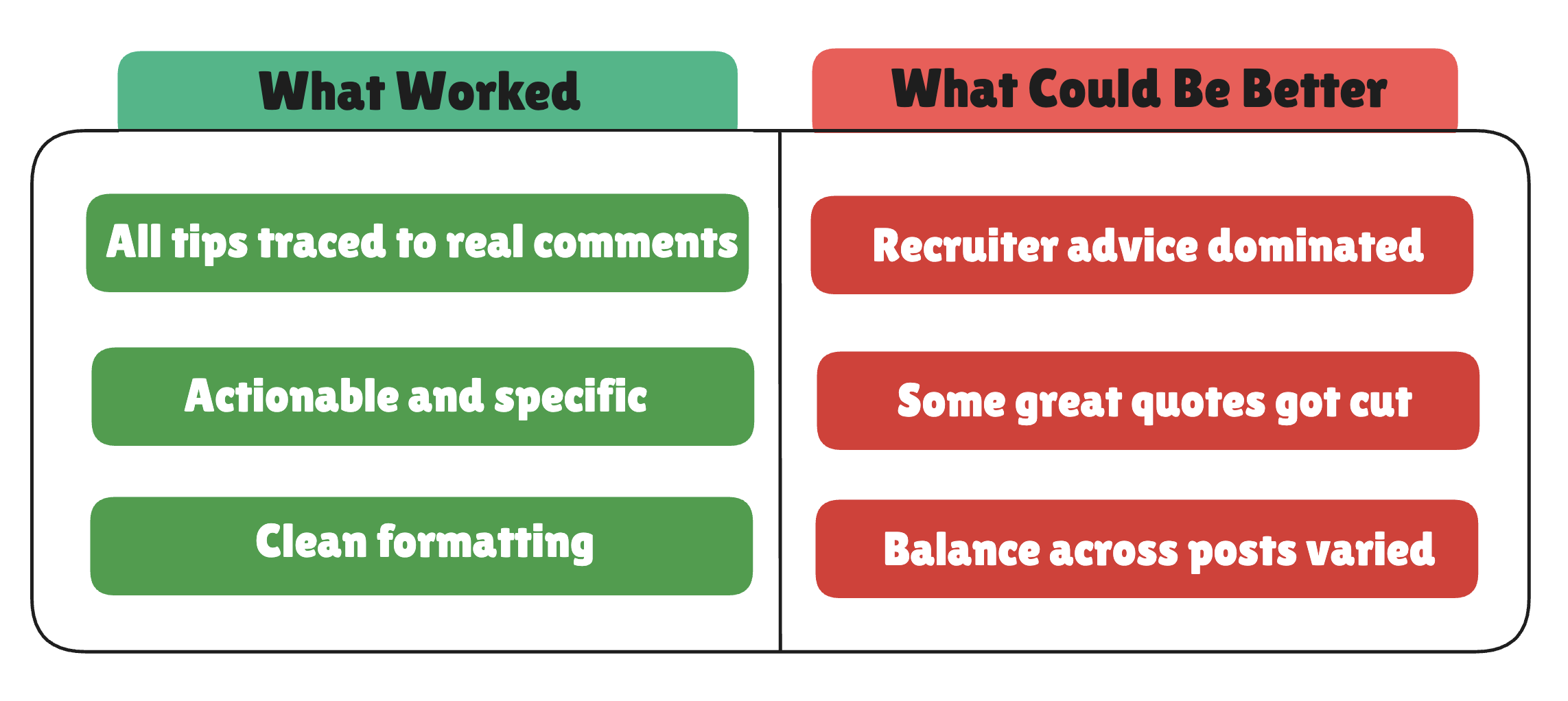
Is it perfect? No. Is it better than reading 619 comments? Absolutely.
When Things Break (And How to Fix Them)
Building this taught me more about failure modes than success cases. Here's what broke and how I fixed it.
Notice how recruiter advice dominated our results? That's because one post had stronger comments that overshadowed the others.
To fix this, you can add these lines to your LLM prompt:
"Include at least one tip from EACH of the 5 posts.Don't let any single discussion dominate the list."This forces the LLM to pull wisdom from every discussion, not just the loudest one.
Try Different Topics
The beauty of this tool? Change one line and extract wisdom on anything:Here are some topics that work well:

What I Learned + What to Build Next
You just built a personal research assistant that reads hundreds of comments and gives you the highlights. Two API calls. Around 50 lines of code. Pennies per run.
Firecrawl's Agent is basically web scraping for people who have better things to do than write Selenium scripts. Describe what you want, get structured data back. Pair it with an LLM, and you've got a knowledge extraction AI that you can point at almost anything.
Want some ideas for what to build next?
- Scrape job boards and extract salary ranges by role
- Pull product reviews from Reddit and summarize sentiment
- Extract conference talk discussions and find the most-recommended sessions
- Build your own "What does the internet think about X?" tool.
Frequently Asked Questions
What is Firecrawl?
Firecrawl is a web scraping tool with an "agent" mode that lets you describe scraping tasks in plain English instead of writing CSS selectors and browser automation code. You tell it "Go to HN, find top discussions, extract comments" and it handles the clicking, waiting, and navigation automatically. The agent returns structured JSON that matches the Pydantic schema you define.
Do I need to know Selenium or web scraping?
No. That's the entire point of using Firecrawl. Traditional web scraping requires managing headless browsers, handling timing issues, writing CSS selectors that break when sites update, and building retry logic. Firecrawl agent abstracts all of that away. You write a natural language prompt, and the agent figures out the implementation details.
How much does this cost?
Firecrawl's free tier includes 500 page credits. Each run uses roughly 6 pages (1 search result page + 5 discussion pages), so you get about 80 free runs to test. After that, paid plans start at $16/month for 3,000 credits. The LLM cost depends on your provider, W&B Inference charges about $0.01 per analysis. Total per-run cost after completing your free tier is approximately $0.042.
Can I use a different LLM?
Yes. The code uses OpenAI's client library, which works with any OpenAI-compatible API. You can swap in OpenAI GPT, Anthropic Claude (with an adapter), OpenRouter, or even local models via LiteLLM. Just change the base_url and api_key parameters in the OpenAI client initialization.
Can I scrape sites other than Hacker News?
Yes, but you'll need to modify the prompt and Pydantic schemas to match the target site's structure. The same pattern works for Reddit, Stack Overflow, Dev.to, Product Hunt, or any public website. Firecrawl handles JavaScript-rendered content automatically, so dynamic sites work fine. Sites with aggressive anti-bot measures (like LinkedIn) may fail.
How long does it take to run?
Firecrawl's scraping takes 30-90 seconds depending on how many pages it needs to navigate. The LLM analysis adds another 5-10 seconds. Total runtime is typically 60-100 seconds from start to finish. You can run this on a schedule using cron jobs or GitHub Actions for automated weekly digests.
What if Firecrawl can't scrape a site?
Firecrawl works best with public sites that don't require authentication. Sites with aggressive anti-bot detection may block requests. Hacker News works reliably because it's open and doesn't employ bot-blocking measures. If scraping fails, Firecrawl returns an error in the response, and the code handles it gracefully by skipping analysis.
Why truncate comments to 500 characters?
Two reasons. First, some HN comments are 2000+ words, and feeding entire essays to the LLM would hit token limits quickly. Second, truncation forces the LLM to extract core messages instead of getting lost in details. If you need full comments, remove the [:500] slice, but expect higher token costs.
Can I run this on a schedule?
Yes. Wrap the code in a cron job or GitHub Action to run weekly. You can process multiple topics in one run and email yourself the results. The code is stateless, so scheduling requires no additional infrastructure, just set up a timer and point it at your script.
What's the pause between Step 1 and Step 2 for?
Debugging. If Firecrawl returns empty or malformed data, you see it before wasting an LLM API call. The input() line lets you review the raw JSON and abort if Step 1 failed. Remove this line if you're running the script unattended on a schedule.