2026 is the year of AI agents. Not chatbots that answer questions, actual agents that know you, learn from your behavior, and provide personalized recommendations that get better over time.
But here's the dirty secret: most "AI agents" aren't really agents at all. They're just ChatGPT with a fancy wrapper and some hardcoded rules.
Why? Because building a truly personalized agent requires something most developers don't think about until it's too late: a way to search through millions of data points based on meaning, not just keywords.
That's where vector databases come in.
In this article, I'll show you why vector databases aren't just nice-to-have for AI agents, they're fundamental. We'll build a real multi-tenant personal finance advisor that:
- Handles 10,000 users with isolated data
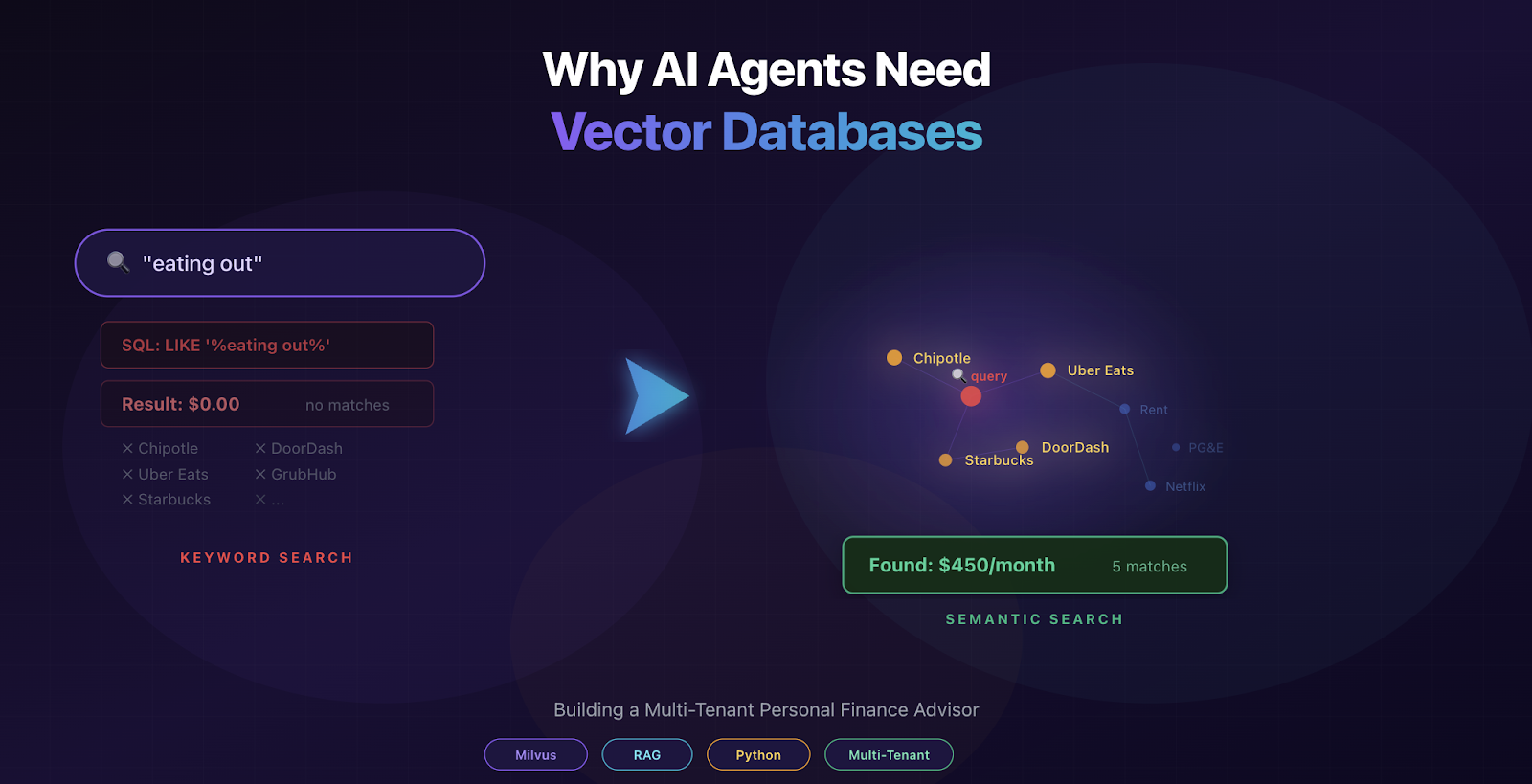
- Understands queries semantically ("eating out" finds "restaurants" and "Uber Eats")
- Provides personalized advice by combining multiple data sources
- Learns from patterns across similar users
By the end, you'll understand:
- Why traditional databases fail for AI agents
- How vector databases enable semantic search at scale
- The exact architecture for multi-tenant AI agents
- Complete working code you can adapt
Let's dive in.
What Makes an AI Agent Different from ChatGPT
Before we talk about solutions, let's be clear about what we mean by an "AI agent."
ChatGPT is a language model. You ask it a question, it generates an answer based on patterns in its training data. It doesn't know you. Ask it "How much am I spending on groceries?" and it'll give you general budgeting advice. Helpful, but generic.
An AI agent, on the other hand, is personalized. It knows:
- Your actual spending history
- Your financial goals
- What worked for users similar to you
- Expert advice relevant to your situation
The same question "How much am I spending on groceries?", gets a different answer:
ChatGPT: "The average American spends $400-600 on groceries monthly. Try meal planning to reduce costs."
AI Agent: "You're spending $1,122/month on groceries, mostly at Whole Foods. That's 40% above average for your income bracket. Users like you who switched to meal prepping saved $400/month. Given your emergency fund goal of $10,578, this could accelerate your timeline by 6 months."
See the difference? The agent searched through your data, found relevant patterns, and synthesized a personalized response.
The Personalization Challenge
Let's say you want to build a personal finance agent. Each user has:
- 500+ transactions per year
- 2-3 financial goals
- Unique spending patterns
With 10,000 users, that's:
- 5,000,000 transactions to search through
- 20,000 goals to track
- Infinite possible questions
When a user asks "Why am I overspending?", your agent needs to:
- Search their transactions for relevant patterns
- Find their goals to provide context
- Look up similar user strategies that worked
- Reference expert advice matching their situation
- Synthesize everything into a coherent answer
All in under 2 seconds.
How do you search 5 million records that quickly? And more importantly, how do you find the right records when the user's question doesn't exactly match your data?
Why Keyword Search Fails
Your first instinct might be: "Use SQL with full-text search."
Here's why that breaks down immediately:
User asks: "How much am I spending on eating out?"
SQL query:
SELECT SUM(amount)
FROM transactions
WHERE user_id = 'user_00042'
AND description LIKE '%eating out% |
Result: $0 (No transactions have "eating out" in the description)
Actual spending on eating out: $450/month across:
- Chipotle
- Uber Eats
- DoorDash
- Starbucks
- Local restaurants
The problem? Semantic mismatch. Your user thinks in concepts ("eating out"), but your data contains specific merchants ("Chipotle"). Traditional keyword search can't bridge that gap.
You could try:
WHERE description LIKE '%Chipotle%'
	OR description LIKE '%restaurant%'
	OR description LIKE '%Uber Eats%'
	OR ... |
But now you're hardcoding every possible food merchant. And what about:
- "GrubHub" (food delivery)
- "7-Eleven" (sometimes groceries, sometimes snacks)
- "Whole Foods hot bar" (is this groceries or eating out?)
You'd need thousands of rules, constant updates, and you'd still miss edge cases.
Worse: Different users use different terminology:
- "eating out" vs. "dining" vs. "restaurants" vs. "takeout"
- "groceries" vs. "food shopping" vs. "supermarket"
- "subscriptions" vs. "recurring charges" vs. "monthly fees"
Keyword search requires exact matches. But human language doesn't work that way.

Image By Author
How Embeddings Work (The Simple Version)
Here's the core concept that makes everything else possible:
Traditional databases store text:
"Chipotle burrito bowl" → stored as "Chipotle burrito bowl"
Vector databases store meaning:
"Chipotle burrito bowl" → [0.234, -0.561, 0.789, ..., 0.456] (384 numbers)
Those numbers are called an embedding, a mathematical representation of the text's meaning.
Here's what makes embeddings powerful: similar concepts have similar numbers.
"Chipotle burrito" → [0.234, -0.561, 0.789, ...]
"Mexican restaurant" → [0.245, -0.552, 0.776, ...] ← 92% similar!
"eating out" → [0.238, -0.558, 0.794, ...] ← 91% similar!
"mortgage payment" → [0.012, -0.234, 0.156, ...] ← 12% similar
This means you can search by meaning, not just exact words.

Image By Author
Query: "eating out" Finds: Chipotle, Uber Eats, restaurants, delivery, anything related to dining
Query: "recurring bills" Finds: Netflix, Spotify, rent, utilities, anything that repeats monthly
No hardcoded rules. No keyword matching. Just math.
Semantic Search in Action
Let's see this with real code. Here's how you convert text to an embedding:
from sentence_transformers import SentenceTransformer
model = SentenceTransformer('all-MiniLM-L6-v2')
# Convert transaction to embedding
transaction = "groceries at Whole Foods $85.50"
embedding = model.encode(transaction)
print(len(embedding))  # 384 numbers
print(embedding[:5])   # [0.234, -0.561, 0.789, -0.123, 0.456] |
Now store these embeddings in Zilliz:
from pymilvus import MilvusClient
client = MilvusClient(uri=ZILLIZ_URI, token=ZILLIZ_TOKEN)
# Create collectionclient.create_collection(
	collection_name="user_transactions",
    dimension=384,
    auto_id=True
    )

# Insert transaction with embedding
client.insert("user_transactions", [{
	"vector": embedding,
    "user_id": "user_00042",
    "amount": 85.50,
    "category": "groceries",
    "merchant": "Whole Foods",
    "date": "2025-01-15"
    }])
When the user asks "How much am I spending on food?", you:
1. Convert the query to an embedding:
query = "How much am I spending on food?"
query_embedding = model.encode(query)
2. Search for similar embeddings
results = client.search(
	collection_name="user_transactions",
    data=[query_embedding],
    filter='user_id == "user_00042"',  # Only this user's data
    limit=30,
    output_fields=["amount", "category", "merchant"]
    )
3. Get relevant transactions automatically
Found:
- $85.50 at Whole Foods (groceries)
- $42.30 at Chipotle (restaurants)
- $15.99 at Uber Eats (delivery)
- $8.50 at Starbucks (coffee)
Notice what happened: You searched for "food" and found groceries, restaurants, delivery, and coffee, **without writing a single keyword rule**.
The embedding model learned that all these concepts relate to "food" from training on billions of text examples. You get that intelligence for free.
Multi-Collection Architecture: The Secret Sauce
Here's where vector databases become essential for AI agents.
A real agent doesn't just search one type of data. It needs to search **multiple sources** and combine them:

In Zilliz, you create separate collections for each data type:
# Collection 1: User transactions (5M records across all users)
client.create_collection("user_transactions", dimension=384)# Collection 2: User goals (20K records)
client.create_collection("user_goals", dimension=384)# Collection 3: Success patterns (anonymized cross-user data)
client.create_collection("successful_patterns", dimension=384)# Collection 4: Financial knowledge base
client.create_collection("financial_knowledge", dimension=384)Now when the agent answers a question, it searches ALL four collections:
def get_advice(user_id, query):
    query_emb = model.encode(query)

    # Search 1: User's own transactions
    transactions = client.search(
        collection_name="user_transactions",
        data=[query_emb],
        filter=f'user_id == "{user_id}"',  # Isolated!
        limit=30
    )

    # Search 2: User's goals
    goals = client.search(
        collection_name="user_goals",
        data=[query_emb],
        filter=f'user_id == "{user_id}"',
        limit=5
    )

    # Search 3: What worked for similar users
    patterns = client.search(
        collection_name="successful_patterns",
        data=[query_emb],
        filter='income_bracket == "50-75K"',  # Similar users
        limit=5
    )

    # Search 4: Expert advice
    knowledge = client.search(
        collection_name="financial_knowledge",
        data=[query_emb],
        limit=3
    )

    # Combine all context and send to LLM
    return synthesize_response(transactions, goals, patterns, knowledge)
Architecture - Personal Finance Agent
Multi-Source RAG: How It All Comes Together
RAG stands for Retrieval-Augmented Generation. The pattern is:
- Retrieve relevant information from multiple sources
- Augment the LLM prompt with that information
- Generate a response based on retrieved context
Prerequisites
You'll need:
- Zilliz Cloud account (free tier: 5GB storage)
- W&B Inference API key (for the LLM)
- Python 3.8+
Here's the actual code:
Step 1: Install Dependencies
!pip install -q pymilvus faker openaiStep 2: Configure Credentials
Set up authentication for Zilliz Cloud (vector database) and W&B Inference (LLM). Get your Zilliz credentials from https://cloud.zilliz.com and W&B key from https://wandb.ai/authorize.
ZILLIZ_CLOUD_URI = ""
ZILLIZ_CLOUD_TOKEN = ""
WANDB_API_KEY = ""

import os
os.environ["WANDB_API_KEY"] = WANDB_API_KEY
Step 3: Initialize Embedding & Chat Client
Creates a hybrid client that uses local sentence-transformers for embeddings (free, fast) and W&B Inference for chat responses (Qwen model). Tests connection on initialization.
from sentence_transformers import SentenceTransformer
from openai import OpenAI
from pymilvus import MilvusClient, DataType

model = SentenceTransformer("all-MiniLM-L6-v2")
llm   = OpenAI(api_key=WANDB_API_KEY, base_url="https://api.inference.wandb.ai/v1")
db    = MilvusClient(uri=ZILLIZ_CLOUD_URI, token=ZILLIZ_CLOUD_TOKEN)

def embed(text):
    return model.encode(text).tolist()

def chat(messages, max_tokens=400):
    r = llm.chat.completions.create(
        model="Qwen/Qwen3-235B-A22B-Instruct-2507",
        messages=messages, max_tokens=max_tokens, temperature=0.7)
    return r.choices[0].message.content.strip()
Step 4: Generate Synthetic Financial Data
Generates realistic financial data for 10 users: 500 transactions (rent, groceries, restaurants, subscriptions, shopping) and 10 financial goals. Creates a 2-month transaction history per user.
import random
from datetime import datetime, timedelta

MERCHANTS = {
    "rent":          (["Landlord"],              1200, 2500),
    "groceries":     (["Whole Foods","Safeway"],   50,  180),
    "restaurants":   (["Chipotle","Starbucks"],     8,   65),
    "utilities":     (["PG&E"],                    60,  180),
    "subscriptions": (["Netflix","Spotify"],        10,   80),
    "shopping":      (["Amazon","Target"],          20,  200),
}

transactions, goals = [], []
for i in range(10):
    uid   = f"user_{i:05d}"
    start = datetime.now() - timedelta(days=60)

    for month in range(2):
        base = start + timedelta(days=month * 30)
        for cat in ["rent", "utilities"]:
            ms, lo, hi = MERCHANTS[cat]
            transactions.append(dict(user_id=uid, amount=round(random.uniform(lo, hi), 2),
                category=cat, merchant=ms[0], date=base, description=cat))
        for _ in range(2):
            ms, lo, hi = MERCHANTS["subscriptions"]
            transactions.append(dict(user_id=uid, amount=round(random.uniform(lo, hi), 2),
                category="subscriptions", merchant=random.choice(ms),
                date=base + timedelta(days=random.randint(1, 28)), description="subscription"))

    for _ in range(42):
        cat = random.choice(["groceries", "restaurants", "shopping"])
        ms, lo, hi = MERCHANTS[cat]
        transactions.append(dict(user_id=uid, amount=round(random.uniform(lo, hi), 2),
            category=cat, merchant=random.choice(ms),
            date=start + timedelta(days=random.randint(0, 60)), description=cat))

    goals.append(dict(user_id=uid, goal="Save for emergency fund",
        target_amount=random.randint(5000, 15000),
        current_amount=random.randint(0, 5000), priority="high"))

print(f"Generated {len(transactions)} transactions, {len(goals)} goals for 10 users")
Step 5: Create Zilliz Collections
Creates 4 vector collections with proper schemas: user_transactions, user_goals, successful_patterns, and financial_knowledge. Each collection has auto_id=True to automatically generate unique IDs and uses COSINE similarity for vector search.
COLLECTIONS = {
    "user_transactions": [
        ("user_id", DataType.VARCHAR, 50),   ("amount", DataType.DOUBLE, None),
        ("category", DataType.VARCHAR, 50),  ("merchant", DataType.VARCHAR, 100),
        ("date", DataType.VARCHAR, 20),      ("description", DataType.VARCHAR, 200)],
    "user_goals": [
        ("user_id", DataType.VARCHAR, 50),   ("goal", DataType.VARCHAR, 200),
        ("target_amount", DataType.DOUBLE, None), ("current_amount", DataType.DOUBLE, None),
        ("priority", DataType.VARCHAR, 20)],
    "successful_patterns": [
        ("pattern", DataType.VARCHAR, 200),  ("income_bracket", DataType.VARCHAR, 20),
        ("outcome", DataType.VARCHAR, 200),  ("category", DataType.VARCHAR, 50)],
    "financial_knowledge": [
        ("topic", DataType.VARCHAR, 50),     ("content", DataType.VARCHAR, 500),
        ("category", DataType.VARCHAR, 50)],
}

for name, fields in COLLECTIONS.items():
    if db.has_collection(name): db.drop_collection(name)
    schema = MilvusClient.create_schema(auto_id=True, enable_dynamic_field=True)
    schema.add_field("id", DataType.INT64, is_primary=True, auto_id=True)
    schema.add_field("vector", DataType.FLOAT_VECTOR, dim=384)
    for fname, dtype, ml in fields:
        schema.add_field(fname, dtype, **({} if ml is None else {"max_length": ml}))
    idx = MilvusClient.prepare_index_params()
    idx.add_index(field_name="vector", index_type="AUTOINDEX", metric_type="COSINE")
    db.create_collection(collection_name=name, schema=schema, index_params=idx)
    print(f"Created: {name}")
Step 6: Insert Data with Embeddings
Converts each transaction, goal, pattern, and knowledge item into vector embeddings using the local model. Inserts ~518 total vectors into Zilliz (~1 MB storage). Takes 2-3 minutes for 10 users.
for i in range(0, len(transactions), 50):
    batch = transactions[i:i+50]
    db.insert("user_transactions", [{
        "vector": embed(f"{t['category']} at {t['merchant']} ${t['amount']:.2f}"),
        "user_id": t["user_id"], "amount": t["amount"], "category": t["category"],
        "merchant": t["merchant"], "date": t["date"].strftime("%Y-%m-%d"),
        "description": t["description"],
    } for t in batch])

db.insert("user_goals", [{
    "vector": embed(f"{g['goal']} ${g['target_amount']}"),
    "user_id": g["user_id"], "goal": g["goal"], "target_amount": g["target_amount"],
    "current_amount": g["current_amount"], "priority": g["priority"],
} for g in goals])

db.insert("financial_knowledge", [
    {"vector": embed(c), "topic": "advice", "content": c, "category": cat}
    for c, cat in [
        ("Build 3-6 months expenses for emergency fund",  "savings"),
        ("Subscriptions should be <5% of income",         "budgeting"),
        ("Meal planning reduces costs 20-30%",            "budgeting"),
        ("Eating out costs 3-5x more than cooking",       "budgeting"),
    ]])

db.insert("successful_patterns", [
    {"vector": embed(f"{p} {o}"), "pattern": p, "outcome": o,
     "income_bracket": ib, "category": "savings"}
    for p, o, ib in [
        ("Meal prep on Sundays",           "Saved $400/month",           "50-75K"),
        ("Canceled unused subscriptions",  "Saved $150/month",           "50-75K"),
        ("Automated savings",              "Saved $12K in 1 year",       "50-75K"),
        ("High-yield savings account",     "Earned $450 extra annually", "75-100K"),
    ]])

print("All data inserted!")
Step 7: Build the Finance Agent
Creates the agent that orchestrates multi-source RAG: searches user's transactions (filtered by user_id), goals, success patterns, and expert knowledge. Combines results into context and sends to W&B Inference for personalized advice generation.
def get_advice(user_id, query):
    q = embed(query)

    trans = db.search("user_transactions", data=[q],
        filter=f'user_id == "{user_id}"', limit=30,
        output_fields=["amount", "category", "merchant"])[0]

    user_goals = db.query("user_goals",
        filter=f'user_id == "{user_id}"',
        output_fields=["goal", "target_amount", "current_amount"])

    pats = db.search("successful_patterns", data=[q],
        limit=3, output_fields=["pattern", "outcome"])[0]

    know = db.search("financial_knowledge", data=[q],
        limit=2, output_fields=["content"])[0]

    ctx = ""
    if trans:
        totals = {}
        for t in trans[:10]:
            e = t["entity"]
            totals[e["category"]] = totals.get(e["category"], 0) + e["amount"]
        ctx += "SPENDING BY CATEGORY:\n"
        ctx += "\n".join(f"- {c}: ${v:.2f}" for c, v in sorted(totals.items(), key=lambda x: -x[1]))
    if user_goals:
        g = user_goals[0]
        ctx += f"\n\nGOAL: {g['goal']} (${g['current_amount']:.0f}/${g['target_amount']:.0f})"
    if pats:
        ctx += "\n\nWHAT WORKED FOR SIMILAR USERS:\n"
        ctx += "\n".join(f"- {p['entity']['pattern']} -> {p['entity']['outcome']}" for p in pats)
    if know:
        ctx += "\n\nEXPERT ADVICE:\n"
        ctx += "\n".join(f"- {k['entity']['content']}" for k in know)

    return chat([
        {"role": "system", "content": "You are a personal finance advisor. Give specific, "
         "actionable advice based on the user's data. 150-200 words, 2-3 recommendations."},
        {"role": "user", "content": f"{ctx}\n\nQuestion: {query}"}
    ])
Step 8: Test the Agent
Runs demo queries against the agent. Shows the complete workflow: query → embedding → vector search → context building → LLM response. Each query returns personalized advice based on the user's actual spending data and goals.
for q in ["How much am I spending on food?",
          "What are my biggest expenses?",
          "Help me save money"]:
    print(f"\nUSER: {q}")
    print(f"AGENT: {get_advice('user_00000', q)}\n")
Results & Real Examples
Let's see this agent in action and compare it to traditional approaches.
Side-by-Side Comparison
Here's what users get with the vector-powered agent vs. a traditional SQL-based system:
Query 1: "Why am I overspending?"
Traditional SQL Approach:
-- Developer has to hardcode "overspending" logic
SELECT category, SUM(amount) as total
FROM transactions
WHERE user_id = 'user_00042'
AND amount > 100  -- Arbitrary threshold
GROUP BY category
ORDER BY total DESC
Response:
"Your highest spending categories are: Groceries ($1,077), Shopping ($457), Restaurants ($73)."
Problems:
❌ No context (is $1,077 high for groceries?)
❌ No recommendations (what should the user do?)
❌ No personalization (same response for everyone)
❌ Doesn't understand "overspending" semantically
Vector Agent Approach:
agent.get_advice("user_00042", "Why am I overspending?")Response:
"Your biggest expense is groceries at $1,077/month, which is 40% above average for your income bracket of $50-75K. Combined with $457 on shopping and $73 on restaurants, you're spending heavily on variable categories.
Given your emergency fund goal ($2,134 of $10,578 saved), here's how to accelerate:
- Reduce grocery costs - Try meal prepping on Sundays (similar users in your income bracket saved $400/month doing this)
- Limit shopping - Set a $250/month budget for non-essentials and use the 48-hour rule for purchases over $50
- Track everything - Download your transactions weekly to identify additional spending leaks
These changes could free up $500+/month toward your emergency fund, cutting your timeline from 17 months to 9 months."
Why it's better:
✅ Contextualizes spending (40% above average)
✅ Provides specific recommendations
✅ Draws from similar user success stories
✅ Ties advice to user's actual goal
✅ Quantifies impact ($500/month savings)
Scaling Zilliz
From 10K to 1M Users: Vector Database Architecture
Here's how Zilliz handles growth:

Key insight: Vector search time scales logarithmically, 100x more vectors doesn't mean 100x slower searches. Actual latency depends on your index type, hardware, and filter complexity.
Zilliz-Specific Optimizations
1. Index Selection by Scale
Zilliz automatically chooses indexes, but you can optimize:
# Small scale (<1M vectors): AUTOINDEX
index_params = MilvusClient.prepare_index_params()
index_params.add_index(
    field_name="vector",
    index_type="AUTOINDEX",  # Let Zilliz decide
    metric_type="COSINE"
)
# Medium scale (1M-10M vectors): IVF_FLAT
index_params.add_index(
    field_name="vector",
    index_type="IVF_FLAT",
    metric_type="COSINE",
    params={"nlist": 1024}  # Number of clusters
)
# Large scale (10M+ vectors): HNSW
index_params.add_index(
    field_name="vector",
    index_type="HNSW",
    metric_type="COSINE",
    params={"M": 16, "efConstruction": 200}
)
Performance comparison (10M vectors):
- AUTOINDEX (<1M vectors): Let Zilliz decide. Good default for getting started, requires no tuning.
- IVF_FLAT (1M-10M vectors): Cluster-based search. Tunable via nlist and nprobe parameters. Handles filtered queries (like user_id filtering) efficiently.
- HNSW (10M+ vectors): Graph-based search. Fastest unfiltered recall, but uses ~2x storage. Tune with M and efConstruction.
Actual latency and recall depend on your parameters, dataset size, and dimensionality. Benchmark with your own workload, don't trust generic numbers.
2. Partition Strategy for Multi-Tenancy
At scale, partition by user segments:
# Create partitions for different user tiers
client.create_partition(
    collection_name="user_transactions",
    partition_name="premium_users"
)

client.create_partition(
    collection_name="user_transactions",
    partition_name="free_users"
)
# Insert with partition
client.insert(
    collection_name="user_transactions",
    data=premium_user_data,
    partition_name="premium_users"
)
# Search specific partition (3x faster!)
results = client.search(
    collection_name="user_transactions",
    data=[query_embedding],
    partition_names=["premium_users"],  # Only search 100K users
    filter='user_id == "user_00042"',
    limit=30
)
Benefits:
✅ 3-5x faster queries (smaller search space)
✅ Easier to scale different user tiers
✅ Can apply different retention policies
3. Collection Sharding Strategy
For massive scale, split collections temporally:
# Monthly sharded collections
collections = [
    "transactions_2025_01",  # Current month
    "transactions_2025_02",
    "transactions_2024_12",  # Older data
]
# Search recent data only (faster)
recent_results = client.search(
    collection_name="transactions_2025_01",
    data=[query_embedding],
    filter='user_id == "user_00042"',
    limit=20
)
# Search historical if needed
if len(recent_results) < 20:
    historical = client.search(
        collection_name="transactions_2024_12",
        data=[query_embedding],
        filter='user_id == "user_00042"',
        limit=10
    )
Use when:
- 50M+ vectors in a single collection
- Most queries only need recent data
- You have time-based retention policies
4. Scalar Field Indexing
Speed up filtering with scalar indexes:
# Create collection with scalar index
schema = MilvusClient.create_schema(auto_id=True)

schema.add_field("id", DataType.INT64, is_primary=True)
schema.add_field("vector", DataType.FLOAT_VECTOR, dim=384)
schema.add_field("user_id", DataType.VARCHAR, max_length=50)
schema.add_field("amount", DataType.FLOAT)
schema.add_field("date", DataType.VARCHAR, max_length=20)
# Add index on filtered fields
index_params = MilvusClient.prepare_index_params()
index_params.add_index(
    field_name="user_id",
    index_type="Trie"  # Fast string filtering
)

index_params.add_index(
    field_name="amount",
    index_type="STL_SORT"  # Fast numeric filtering
)

client.create_collection(
    collection_name="user_transactions",
    schema=schema,
    index_params=index_params
)
Performance gain:
Adding scalar indexes on frequently filtered fields (like user_id and amount) significantly speeds up filtered vector search. With a Trie index on string fields, Zilliz can skip irrelevant records before comparing vectors, rather than filtering after, which matters most when only a small fraction of records match the filter.
Conclusion
Most "AI agents" in 2026 are still just prompt templates with a database query stapled on. They can't bridge the gap between how users think ("eating out") and how data is stored ("Chipotle Mexican Grill #4821"). They can't combine multiple knowledge sources into a single coherent answer. They can't serve 10,000 users without leaking data between them.
Could you solve parts of this with pgvector, Elasticsearch, or a well-maintained merchant category table? Sure, for structured data with known categories, simpler tools work fine. But when your users ask freeform questions across multiple data sources and you need semantic understanding out of the box, a purpose-built vector database earns its place in the stack.
Vector databases solve these problems elegantly, semantic search replaces thousands of keyword rules, filtered queries handle multi-tenancy, and multi-collection RAG pulls context from transactions, goals, peer patterns, and expert knowledge simultaneously.
We built it in 157 lines of Python on a free tier. Not "try meal planning", but "meal prepping could save you $400/month and cut your emergency fund timeline from 17 months to 9."
That's not a chatbot. That's an agent. And the gap between the two is a vector database.